Build your call flow by dragging blocks
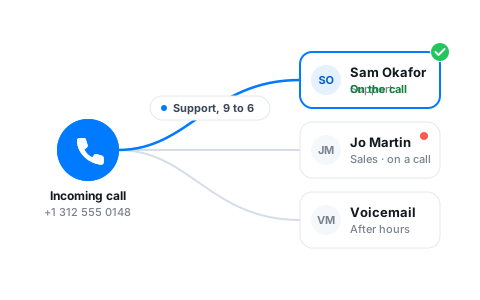
Map out what callers hear before they reach a person, all on one canvas. Drop in a greeting, a voice menu, working hours, and where each option goes.
See the whole path
Every greeting, menu, and handoff sits on a single canvas, so you can follow a call from ring to answer without digging through settings screens.
Press-1 voice menus
Give callers a short menu and send each keypress where it belongs. Sales to the sales team, support to support, billing to whoever owns it.
Hours that decide for you
Set business hours once. Calls during the day ring the team; after-hours calls go straight to a recorded message or voicemail.
Drag, drop, done
The builder works the way you'd sketch a call on a whiteboard. Start with the incoming call, add a greeting, branch into a menu, and connect each option to a person or team. There's no separate config to keep in sync, the canvas is the call flow.
- Snap blocks together to set the order calls move through
- Reroute a branch by dragging its connector somewhere new
- Change a flow live without taking your number offline
Greet callers in your own words
Record a greeting from the app or type one out and let Vylo read it. Use it to welcome callers, explain the menu, or tell people what to expect when the office is closed. Update the wording whenever something changes.
- Record straight from your phone or computer
- Swap the greeting for holidays or one-off closures
- Keep separate greetings for different numbers
Branch on the things that matter
Route by which option the caller pressed, the time of day, or which of your numbers they dialed. Each branch can ring a single person, a whole team, or fall through to voicemail if nobody picks up.

Let an Oly Agent take the call
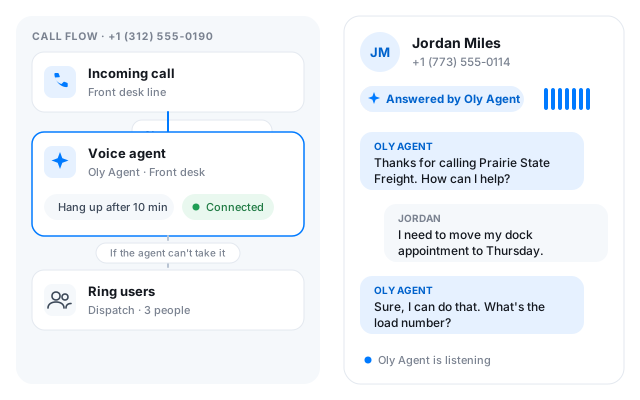
Add a Voice agent step and an Oly Agent you created picks up and talks to the caller, following the instructions you wrote. Put it behind business hours to cover the night shift, or first in line to answer everything. Give the step a maximum length and a next step for the calls it can't take.
- Pick any agent you've created from the list
- Set a hang-up time and a fallback such as ring users or voicemail
- Saving the flow connects the agent to the number
Frequently asked questions
Common questions about build your call flow by dragging blocks
Try Vylo free for 7 days
Calls, SMS, email, team chat and AI call notes in one app.