Everything a business phone should do
Calls, texts, email, team chat, tasks and a calendar in one window, with Oly writing the notes after every call. Here is the whole app, feature by feature.
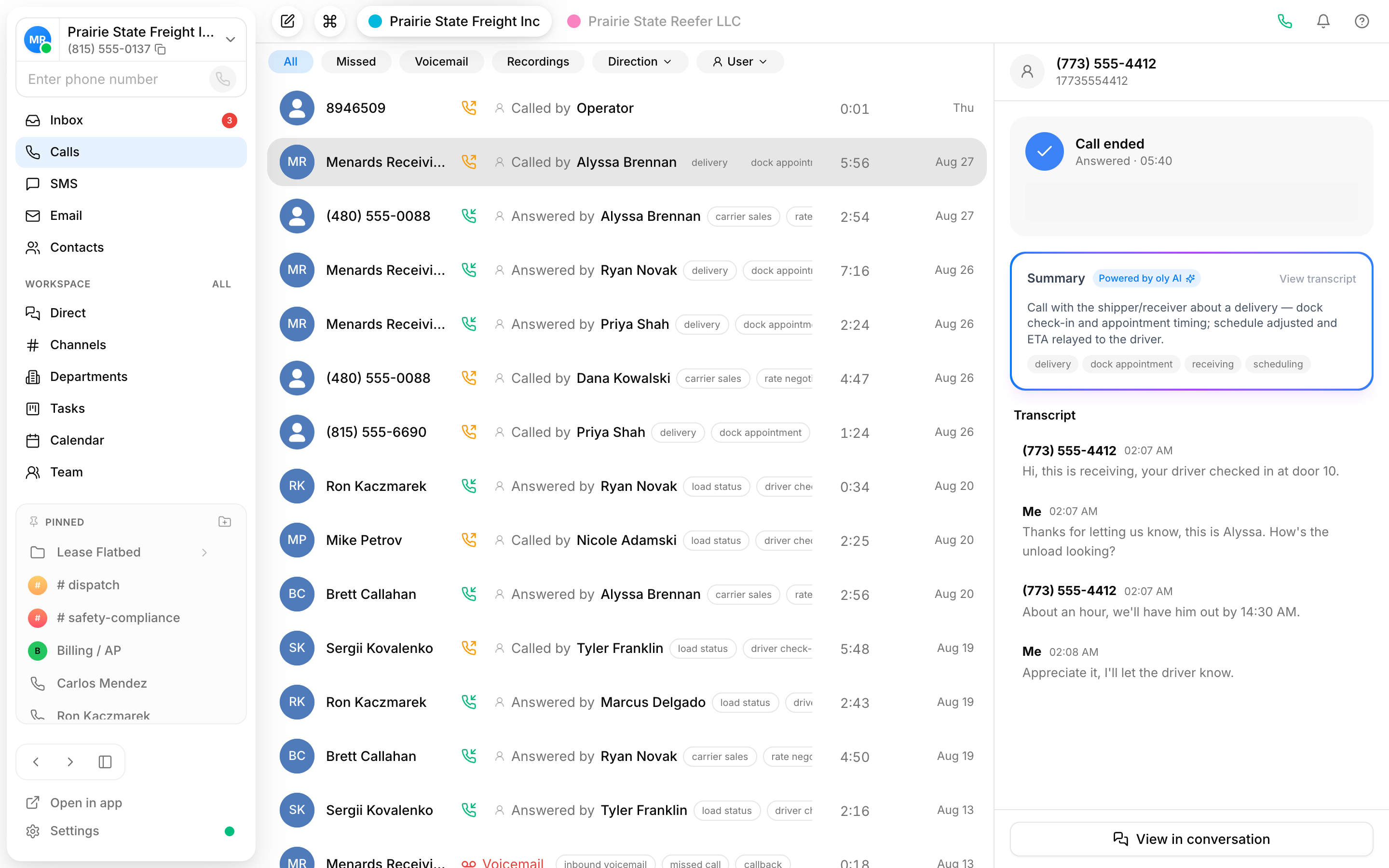
One app for every conversation your business has
Calls, call flows, AI notes, texts, email, team chat, tasks and a calendar in a single window. Here is what you get from day one.
A real phone system, in the same window
Place and answer calls on your own numbers from desktop and mobile, with the controls you expect from a business line.
Inbound & outbound calls
Make and take business calls on your own numbers, from any device you sign in on.
Built-in dial pad
A full keypad for dialing any number without leaving the app.
Live call controls
Mute, put on hold or transfer to a teammate while you are on the call.
Call recording
Answered calls are recorded and ready to play back from the conversation.
Draw the call flow, no code
Map out exactly where each call goes. Greet callers with a voice menu, send them to the right team, or fall back to voicemail after hours. Drag the steps into place and it goes live on your number.
- Voice menus that route by what the caller picks
- Business-hours and after-hours paths
- Voicemail with an automatic transcript
Oly handles the busywork
Oly Agents take the calls you hand them, and the notes write themselves on the rest, so your team spends its time on the conversations that need a person.
An agent that answers your number
Write the instructions, add a Voice agent step to the call flow, and Oly picks up and talks to the caller.
Texts and team chat, next to your calls
Customer texts and internal team chat live in the same app, so nobody jumps between three windows to keep up.
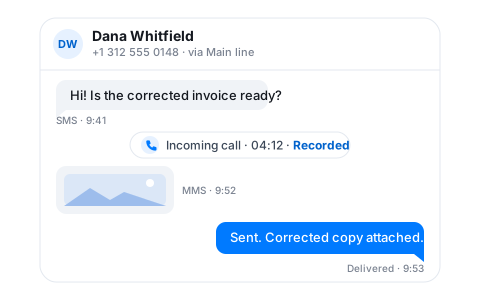
SMS & MMS
Text and send photos from the same number you call on, with replies landing in the same thread.
Unified inbox
Calls and texts with a contact sit together in one conversation.
Channels & direct messages
The team talks in channels and DMs without leaving for a separate chat app.
Video meetings
Start a video meeting in its own window straight from a chat or a contact.
The rest of the workday, in the same window
Mail, the to-do list, the calendar and a live view of the team sit beside your calls, so nothing about a customer lives in a separate tab.
Connect Google, Microsoft 365 or IMAP and read, reply and send from Vylo.
Tasks
Boards with priorities, due dates and assignees. Create a task from any conversation.
Calendar
Day, week and month views, reminders in the app and Google Calendar sync.
Live call monitoring
See who is on a call, listen in, whisper to a teammate or read live subtitles.
Plus everything that keeps a team running
Every feature, by plan
This is the whole app, line by line. Hover any feature for what it does.
Calls
The phone, built into the same window as everything else.
Call flows & routing
Decide where each call goes, with a visual builder.
Messaging & inbox
Calls and texts on the same number land in one thread.
Oly, the built-in assistant
Oly answers calls when you want it to, and takes the notes on the rest.
Team chat & meetings
The team talks in the same app they use with customers.
Contacts
A contact directory that fills itself from your calls and texts.
Workspace & admin
What you need to run this across a team and more than one company.
Apps
Same account, in sync on every device you sign in on.
Calls
Call flows & routing
Messaging & inbox
Oly, the built-in assistant
Team chat & meetings
Contacts
Workspace & admin
Apps
Calls
Call flows & routing
Messaging & inbox
Oly, the built-in assistant
Team chat & meetings
Contacts
Workspace & admin
Apps
Calls
Call flows & routing
Messaging & inbox
Oly, the built-in assistant
Team chat & meetings
Contacts
Workspace & admin
Apps
Calling and SMS usage is billed separately based on destination.
Frequently Asked Questions
Get answers to common questions here
Try Vylo free for 7 days
Calls, SMS, email and team chat in one app